A well-designed golf simulator room is the difference between a system you use every day and one that frustrates you from day one. The most important rule in room design is to start with your room dimensions and your selected launch monitor before making any other decision. The monitor choice affects where the screen goes, how the projector is positioned, and what kind of room flow is possible. Everything else — lighting, flooring, seating, climate, finishing — is built around those core decisions. This guide covers every major element of simulator room design, drawing on what 19th Hole Golf Simulators has learned from building rooms across DFW garages, bonus rooms, and dedicated suites. For dimension basics first, read our golf simulator room requirements guide.
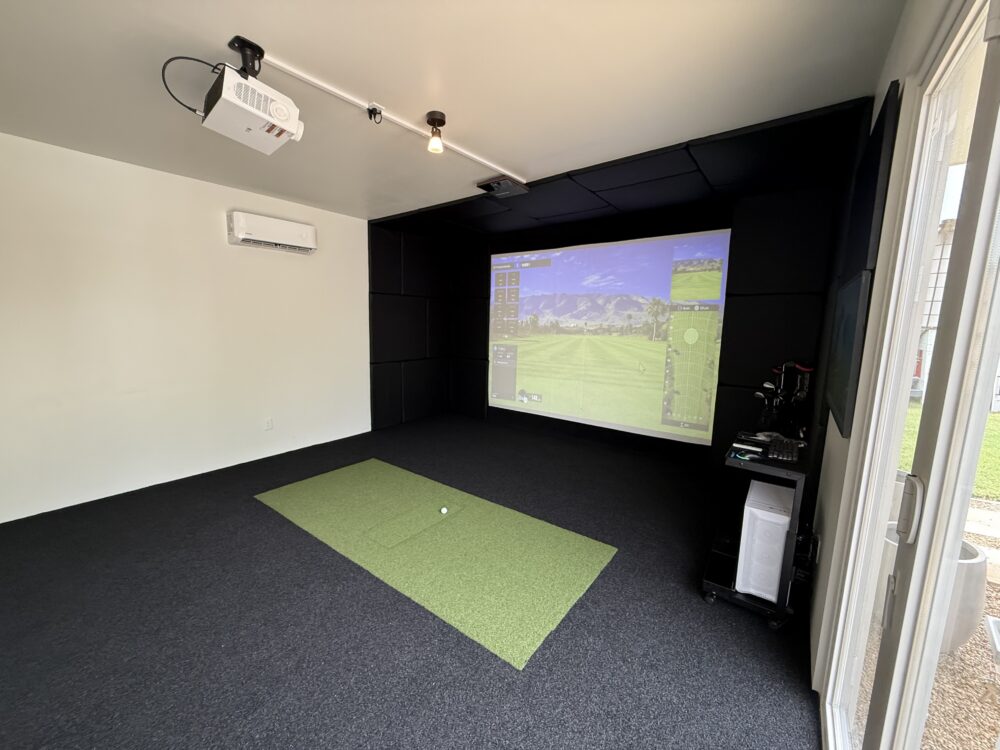
Step 1: Establish Your Room Dimensions and Constraints
Before any equipment is selected, the room needs to be measured completely: ceiling height at the hitting position, ceiling height across the full room (particularly relevant in rooms with sloped ceilings), room width from wall to wall, and room depth from the screen wall to the back wall. Note the location of electrical outlets, windows, HVAC vents, and structural elements like beams or posts.
Windows on the screen wall or the side walls are a lighting challenge. A projector-based system requires controlled ambient light to deliver a clear, bright image. Windows on the screen wall should be identified before installation so blackout solutions can be planned. Side windows are more manageable with curtains or blinds but still require consideration in the lighting plan.
Step 2: Match Your Launch Monitor to Your Room
This is the step most DIY designers skip, and it causes the most problems. Different launch monitors have fundamentally different spatial requirements. Uneekor mounts overhead and requires adequate ceiling clearance above the mount point. TrackMan positions on the floor behind the golfer and requires clear radar sight lines and adequate room depth. FlightScope positions to the side with its own angular requirements.
Choosing a launch monitor without evaluating your room first, or designing your room without knowing which monitor will be installed, leads to layout compromises that cannot be fixed after installation. This is why 19th Hole’s in-person consultation happens before any equipment is recommended. For more on how monitor choice affects room layout, read our launch monitor technology guide.
Step 3: Screen Placement and Enclosure Design
The screen is mounted on or near the front wall. The standard clearance between the front of the screen enclosure and the golfer’s hitting position is 8 to 12 feet, depending on room depth and the monitor’s requirements. Carl’s Place custom screens and enclosures are what 19th Hole installs on every project. The enclosure style — freestanding, wall-mounted, or custom built-in — depends on the room’s wall condition, ceiling height, and the desired level of finish.
The screen wall should ideally be a solid, unobstructed surface with no windows, doors, or protruding fixtures. Any openings in the screen wall allow ambient light to wash out the projected image during daytime use and create safety risks if balls deflect sideways.
Step 4: Projector Placement and Throw Distance
The projector must be matched to the room’s throw distance — the distance between the projector lens and the screen surface. A standard throw ratio projector mounted at the ceiling behind the golfer works well in rooms with 18 to 22 feet of depth. Short-throw and ultra-short-throw projectors mount closer to the screen and are used when ceiling mounting at the back of the room is not feasible.
Projector brightness (measured in lumens) needs to be calibrated to the room’s ambient lighting conditions. A room with controlled lighting can use a lower-lumen projector; a room with uncontrolled light sources requires higher brightness. Projector placement and mounting angle are finalized during the in-person design review, not chosen from a spec sheet.
Step 5: Lighting Design
Lighting in a simulator room serves two functions: creating a comfortable environment for play and not interfering with the projected image. The ideal setup uses recessed LED lighting on a dimmer circuit, positioned so that fixtures do not shine directly onto the screen surface or into the projector lens.
Avoid fluorescent lighting entirely. It creates a flat, harsh environment and cannot be adequately dimmed. LED fixtures with color temperature control allow you to shift between warm and cool light depending on use. Ambient lighting aimed at the side walls or ceiling rather than the screen creates a comfortable room without image washout.
Step 6: Flooring and Turf Layout
The hitting surface is the part of the floor the golfer interacts with directly, and it affects both feel and safety. Options range from a basic hitting mat inset into standard flooring to a full-room luxury vinyl or rubber sports floor with an integrated turf hitting zone.
All-terrain hitting mats that simulate rough and bunker lie angles are available for the highest-tier configurations and add meaningful practice value. The flooring outside the hitting zone should be slip-resistant and durable enough to handle foot traffic, seating, and regular use. Anti-fatigue flooring in the hitting zone reduces physical strain during longer sessions.
Step 7: Climate Control
Climate control in a DFW simulator room is not optional — it is essential. A garage that reaches 110 degrees in August is unusable without dedicated cooling. A mini-split HVAC system is the most efficient and common solution. It provides independent temperature control for the simulator room without affecting the rest of the home’s HVAC system, and it operates quietly enough to not interfere with audio during play.
The Texas State Energy Conservation Office provides guidance on energy-efficient HVAC solutions for residential spaces. Mini-split sizing depends on the room’s square footage and insulation, both of which are evaluated during the consultation.
Step 8: Seating, Storage, and Finishing
The seating area for spectators and waiting players should be positioned out of the swing path — typically along the side wall or at the back of the room. Counter-height seating with a bar surface is a popular choice for tournament nights. Low seating creates a more relaxed entertainment feel.
Club storage, bag racks, and shoe storage keep the room organized. A small beverage station — mini-fridge, counter surface, and cabinet — is a common addition that transforms the room from a practice space into an entertainment destination. The finishing touches make the room feel intentional rather than improvised.
Common Room Design Mistakes
-
Choosing equipment before assessing the room: The most expensive and most common mistake. Fix it by scheduling the in-person consultation first.
-
Ignoring ceiling height at the impact point: A slight ceiling drop or a beam exactly at the peak swing path can make a room unusable. Measure at the hitting position specifically, not just in the middle of the room.
-
Insufficient projector lumens: Rooms with any ambient light need more brightness than the spec sheet suggests. Test projection in your actual lighting conditions before finalizing the projector choice.
-
No blackout treatment on windows: Afternoon sun through a side window creates an image washout problem that is difficult to fix after installation.
-
Skipping climate control in a DFW garage: A room that is unusable in summer is a room that does not get used. Climate control is an investment in actually using the system.
Frequently Asked Questions
Should I design the room before or after choosing the launch monitor?
After. The launch monitor choice affects screen placement, projector throw, and floor layout. Designing the room before knowing which monitor will be installed frequently leads to avoidable compromises.
Do I need a professional room design consultation, or can I plan it myself?
You can plan elements like seating and storage yourself, but screen placement, projector position, launch monitor placement, and lighting configuration require coordination between components. Our in-person consultation is free and covers all of these elements together.
What is the best flooring for a golf simulator room?
Rubber sports flooring or luxury vinyl plank for the main area, with a premium synthetic turf hitting surface at the hitting position. Anti-fatigue properties in the turf reduce strain during longer sessions.
19th Hole Golf Simulators designs, installs, and calibrates custom golf simulator systems across Dallas–Fort Worth. Our in-house team handles every step from in-person consultation through final training.
Call 972-898-0419 or schedule your free consultation online to get started.