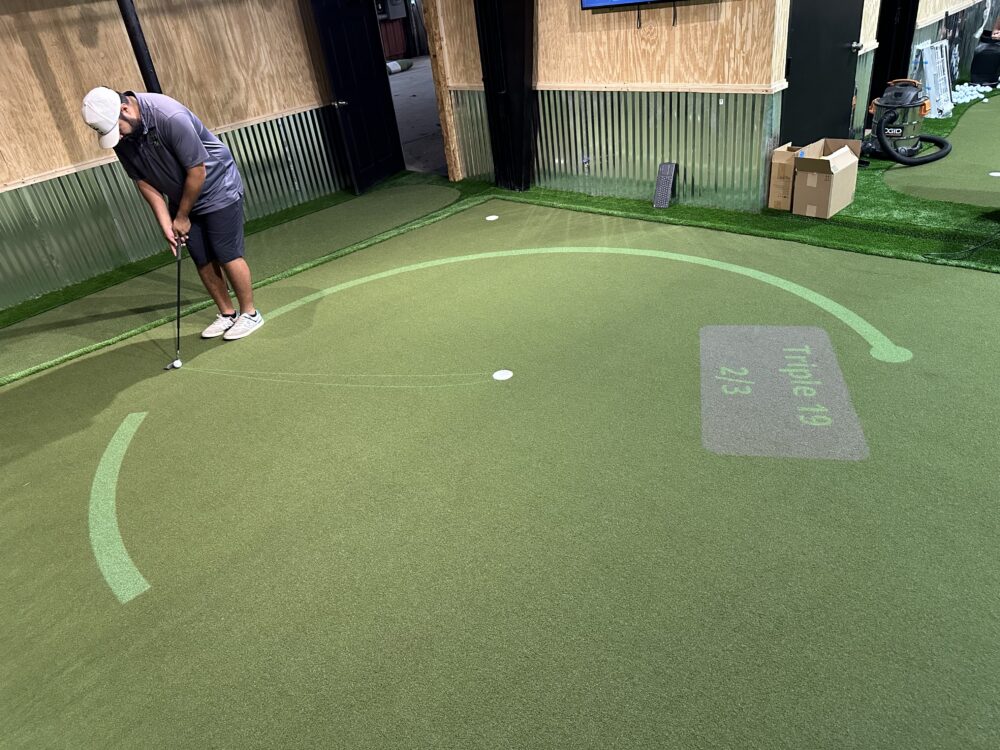
TourPutt is an augmented reality putting system that adds dedicated putting analysis and practice to a home golf simulator installation. Where most simulator packages focus on full swing play from a hitting mat, TourPutt addresses the part of the game that most directly affects scoring: the putt. It uses augmented reality technology to overlay putting data on a physical putting surface, giving golfers real-time feedback on green reading accuracy, start line, and putt speed. Visit TourPutt’s website for current product specifications. 19th Hole Golf Simulators integrates TourPutt into custom installations across DFW.
Why Putting Is the Missing Piece in Most Simulator Setups
Putting accounts for approximately 40 percent of all strokes in a typical amateur round. The USGA and PGA of America have both published data showing that putting improvement, not driving distance, is the fastest path to lower scores for the majority of recreational golfers. Yet most home simulator installations focus exclusively on ball-striking, leaving the short game entirely to on-course practice or the occasional visit to a putting green.
TourPutt closes that gap by bringing structured, data-driven putting practice into the same room as your full swing simulator — turning a single-purpose practice space into a complete indoor golf facility.
How TourPutt’s Augmented Reality Technology Works
TourPutt uses a camera and projection system to display a virtual putting surface overlay on a physical putting mat. The camera tracks the ball from the moment of impact through the full putt, capturing where the ball starts relative to the intended line, how it rolls, how far it travels, and where it finishes relative to the target.
The augmented reality component is the display layer: putting data, line visualization, and feedback appear as an overlay on the surface in real time, allowing the golfer to see exactly what is happening without breaking the flow of a session to check a separate device or app.
What TourPutt Measures
-
Green reading accuracy: Whether the golfer’s read of the break matched the actual ball path. This is one of the most underexamined skills in recreational putting.
-
Start line: Whether the ball started on the intended line at the moment of impact. Start line is the purest measure of stroke mechanics independent of green reading.
-
Putt speed and distance control: How closely the putt speed matched the speed required to finish at or past the hole at the correct distance. Distance control is the most common source of three-putts.
-
Impact consistency: Where on the putter face impact occurs, relevant for golfers developing a more repeatable stroke.
-
Session tracking: Progress data stored across sessions, showing improvement trends in each metric over time.
Who Is TourPutt For?
TourPutt serves a wide range of golfers but is most valuable for three specific groups. First, serious game improvement players who understand that their handicap improvement is limited by putting inconsistency rather than ball-striking. Second, golfers who play regularly at courses with demanding greens — Frisco’s championship venues, DFW’s private club greens — where reading and speed control are premium skills. Third, homeowners who want the simulator room to cover every dimension of golf rather than only the full swing.
TourPutt is also used by golf coaches and instructors who incorporate it into lesson structures. The built-in tracking tools allow instructors to set baseline measurements and track specific improvement targets across sessions.
How TourPutt Integrates Into a 19th Hole Installation
TourPutt is an add-on component that integrates into any 19th Hole Golf Simulator installation. It requires adequate floor space — the putting surface needs to be positioned in a way that does not interfere with the full swing hitting zone. Room design accounts for TourPutt placement during the in-person consultation.
The system is configured and calibrated as part of the installation process. Our team sets up the camera, calibrates the projection overlay, and walks through the full feature set with the client before the installation is complete. See everything that a full 19th Hole installation includes.
TourPutt vs a Practice Putting Green
A physical practice putting green — whether in a backyard or a public facility — lets you putt on a real surface but provides no data. You can see where the ball finished, but you cannot see whether your read was correct, whether your start line was on target, or whether your speed was calibrated to the distance.
TourPutt adds the data layer that a physical green cannot. A session on TourPutt tells you specifically what needs to change and tracks whether that change is happening. A session on a physical green tells you only whether the ball went in. For golfers who want to practice with purpose rather than just practice volume, TourPutt delivers meaningfully more per session.
For a comparison of practice methods and what produces real improvement, read how a home simulator helps you practice more and shoot lower.
Frequently Asked Questions
Does TourPutt work on any surface, or does it require a special putting mat?
TourPutt integrates with a dedicated putting surface that is specified during the installation design process. The surface and system are designed to work together for accurate tracking.
Can TourPutt be added to an existing simulator installation?
In most cases yes, provided the room has adequate floor space for the putting surface. Our team evaluates feasibility during a site visit.
Is TourPutt worth the additional investment?
For golfers who take scoring seriously, TourPutt addresses the aspect of the game most directly linked to scorecard improvement. Whether it is worth it depends on how the room will be used and how much the golfer cares about putting specifically.
19th Hole Golf Simulators designs, installs, and calibrates custom golf simulator systems across Dallas–Fort Worth. Our in-house team handles every step from in-person consultation through final training.
Call 972-898-0419 or schedule your free consultation online to get started.