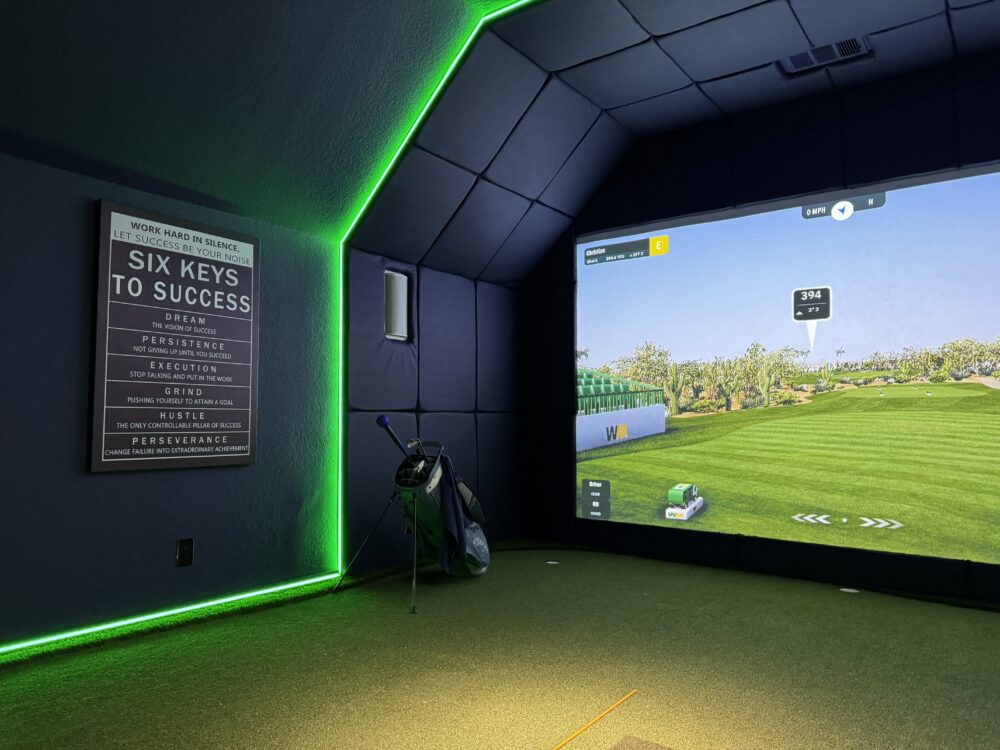
For most golfers, a minimum of 9 feet of ceiling clearance, 10 feet of room width, and 15 feet of room depth is the starting point for a functional home golf simulator installation. However, those are minimums — not the recommended setup for a comfortable, high-performance experience. The right dimensions depend on your height, your selected launch monitor, the screen size you want, and how you plan to use the room. This guide covers what each dimension controls and what the real-world standards are for the rooms 19th Hole Golf Simulators installs across DFW. For dimension-specific questions about your room, read our guide on how much space you actually need or contact us for a free in-person assessment.
Ceiling Height: The Most Critical Measurement
Ceiling height determines whether a full golf swing is physically safe and comfortable. A driver swing at the top of the backswing typically requires 8.5 to 9 feet for a golfer of average height. Taller golfers and those with more upright swing planes need more clearance.
The International Building Code sets minimum habitable room ceiling height at 7 feet, but that minimum has no bearing on what golf requires. Practical guidelines for simulator installations:
-
8 feet: Workable only for shorter golfers (under 5’9″) with compact swings. Limited to certain iron and short game practice. Not suitable for driver use.
-
9 feet: The practical minimum for most golfers up to about 6’1″. Comfortable for all clubs with a reasonable swing plane.
-
10 feet: Recommended for golfers over 6’1″ and for anyone who wants a full, uninhibited swing with every club.
-
10+ feet: Ideal for dedicated simulator suites, commercial installations, and new construction builds where ceiling height can be designed in.
DFW garage construction from the 1990s onward commonly includes 9-foot or 10-foot ceilings, which makes most local garages workable without modification. Older construction and some bonus rooms may need ceiling height verification before a system is designed.
Room Width: Swing Freedom and Screen Size
Room width controls how much lateral space the golfer has on each side of the hitting position and determines the maximum screen width achievable.
-
10 feet minimum: The absolute minimum for a right-handed golfer swinging freely. Very little margin for error in stance or swing width.
-
12 feet: Comfortable for most golfers with room for a standard screen enclosure.
-
14 to 16 feet: Recommended for the best experience. Allows a generous screen width and comfortable seating or spectator space alongside the hitting zone.
-
16+ feet: Premium setups, large Carl’s Place screen configurations, and multi-player comfort seating.
The standard two-car garage in DFW runs 20 feet wide, which leaves generous screen space and comfortable lateral clearance. Single-car garages (typically 10 to 12 feet wide) are workable but leave less margin.
Room Depth: Screen Distance and Ball Tracking
Room depth determines how far the golfer stands from the screen, how much space exists behind the golfer for a full backswing, and whether the launch monitor has an adequate capture window.
-
15 feet minimum: Enough for a basic installation with a shorter projector throw. Limited seating space behind the hitting zone.
-
18 to 20 feet: The sweet spot for most residential builds. Comfortable hitting distance from the screen, adequate backswing clearance, and room for a seating area.
-
20 to 24 feet: Premium depth. Longer projector throw for improved image quality, full seating area, and optimal data capture window for floor-based monitors like TrackMan.
A common guideline from the simulator installation community is to maintain at least 5 feet between the impact point and the screen face, which protects both the equipment and the player from bounce-back risk.
How Your Launch Monitor Choice Changes the Room Requirements
This is one of the most important points in this guide: the room requirements are not fixed — they change based on which launch monitor is selected. This is precisely why the in-person consultation happens before equipment recommendations are made.
-
Uneekor (overhead mount): The camera unit mounts to the ceiling directly above the hitting position, requiring adequate clearance above the unit itself (typically 8 to 9 feet above the floor for the mount height). The floor remains completely clear. Works well in rooms with 15 to 18 feet of depth.
-
TrackMan: Placed behind or beside the golfer on a tripod or floor mount. Requires a clear radar path to the impact zone. Performs best in rooms with 20 feet or more of depth.
-
FlightScope: Floor-mounted to the side. Requires clear line of sight between the unit and the impact zone. Room depth and width need to be evaluated relative to the unit’s positioning angle.
For more on how launch monitor technology interacts with room design, read our guide to launch monitor technology and simulator performance.
Common DFW Room Types and How They Measure Up
Two-Car Garages
The standard DFW two-car garage is approximately 20 feet wide, 20 to 22 feet deep, with 9 to 10-foot ceilings in builds from the past 25 years. This is the most common and most naturally suited space for a home simulator installation. The width handles a large screen with room to spare, the depth supports any launch monitor configuration, and the ceiling height works for the vast majority of golfers.
Bonus Rooms Above Garages
Bonus rooms in DFW homes vary widely. Many run 12 to 16 feet wide and 18 to 24 feet deep. The ceiling height is the most common constraint — 8-foot bonus room ceilings are common in homes built before 2005 and require height verification for taller golfers. Rooms with 9-foot ceilings are generally workable.
Dedicated Simulator Suites
For homeowners building new construction or completing a significant renovation, designing a dedicated room from scratch allows every dimension to be optimized. 19th Hole recommends reaching out before walls are framed so ceiling height, room depth, and electrical placement are designed around the installation rather than adapted to it.
What If Your Room Doesn’t Hit the Minimums?
Many spaces that initially seem too small, too low, or awkwardly shaped still support a meaningful simulator installation. Options include angled screen placement, chip-and-putt focused configurations for rooms with ceiling height constraints, and modified hitting positions that maximize the available depth. Our team has designed functional installations in a wide range of non-standard spaces across DFW.
The only way to know for certain what is possible in your room is an in-person assessment. It takes less than an hour and costs nothing. Explore our DFW service areas or contact us to schedule yours.
Frequently Asked Questions
Can I install a golf simulator in a room with 8-foot ceilings?
Possibly, depending on your height and swing plane. Golfers under 5’9″ with compact swings can often work comfortably in 8-foot rooms. Taller golfers or those with more upright planes typically need at least 9 feet. Our team evaluates your specific situation during the in-person consultation.
Does the launch monitor need special room dimensions?
Yes. Each launch monitor has different spatial requirements — overhead units like Uneekor have ceiling mounting considerations, while floor-based units like TrackMan need adequate depth behind the golfer. This is one reason equipment is never recommended before your room is assessed.
How wide does a golf simulator screen need to be?
Most residential installations use screens between 10 and 14 feet wide. Screen width is determined by your room width, the golfer’s ideal hitting distance from the screen, and the projector’s throw ratio. Our design team specifies the right screen width for each room.
19th Hole Golf Simulators designs, installs, and calibrates custom golf simulator systems across Dallas–Fort Worth. Our in-house team handles every step from in-person consultation through final training.
Call 972-898-0419 or schedule your free consultation online to get started.